
Paths

A path is a uni-directional connection between incoming and outgoing nodes.

It forwards messages from one or more incoming nodes to one or more outgoing nodes. Therefore it represents a n-to-n relation between nodes.

For bidirectional communication a corresponding path in the reverse direction must be added.

By default, message contents are not altered. The server only performs checks for valid message headers (sequence number, cryptographic signature..). However, every path supports optional hook functions which allow user-defined operations on the samples.
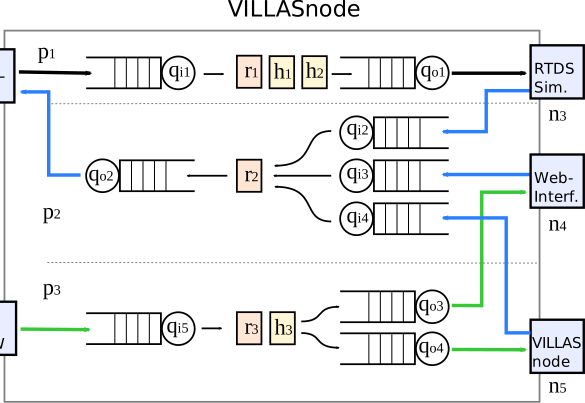
VILLASnode Paths.
VILLASnode Paths.

The path section in the configuration file consists of a list of one or more paths objects.

Configuration

Every path object is configured by the following settings:

required
string or Array of strings

The in settings expects the name of one or more source nodes or mapping expressions.

Checkout the input mapping section for more details.

string or Array of strings

The out setting expects the name of one or more destination nodes. Each sample which is processed by the path will be sent to each of the destination nodes.

enabled
boolean
Default: true

The optional enabled setting can be used to temporarily disable a path.

reverse
boolean
Default: false

By default, the path is unidirectional. Meaning, that it only forwards samples from the source to the destination. Sometimes a bidirectional path is needed. This can be accomplished by setting reverse to true.

mode
string
Default: "any"
Enum: "any" "all"

The mode setting specifies under which condition a path is triggered. A triggered path will multiplex / merge samples from its input nodes and run the configured hook functions on them. Afterwards the processed and merged samples will be send to all output nodes.

Two modes are currently supported:

  • any: The path will trigger the path as soon as any of the masked (see mask) input nodes received new samples.
  • all: The path will trigger the path as soon as all input nodes received at least one new sample.
mask
Array of strings

This setting allows masking the the input nodes which can trigger the path.

See also mode setting.

rate
number >= 0
Default: 0

A non-zero value will periodically trigger the path and resend the last sample again.

A value of zero will disable this feature.

original_sequence_no
boolean
Default: false

When this flag is set, the original sequence number from the source node will be used when multiplexing the nodes.

Array of Hook Object (object) or Hook Name (string) (hook_list)
uuid
string <uuid>

A globally unique ID which identifies the path for the use via the API.

affinity
any

A mask which pins the execution of this path to a set of CPU cores.

poll
boolean

A boolean flag which enables the poll-based mode for reading samples from multiple path sources.

Note: This is an advanced setting. Most users should use the the default value which will always do the right thing based on the number and type of input nodes for this path.

builtin
boolean
Default: true

If enabled, the path will start with a set of default and builtin hook functions.

queuelen
number

The length of the path queue. It limits how many samples can be in flight at any point in time. If you see queue or pool underrun warnings, try to increase this value.

{
  • "in": "string",
  • "out": "string",
  • "enabled": true,
  • "reverse": false,
  • "mode": "any",
  • "mask": [
    ],
  • "rate": 0,
  • "original_sequence_no": false,
  • "hooks": [
    ],
  • "uuid": "095be615-a8ad-4c33-8e9c-c7612fbf6c9f",
  • "affinity": null,
  • "poll": true,
  • "builtin": true,
  • "queuelen": 0
}

Input mapping

The paths[].in setting supports different ways of configuring and selecting the nodes from which the path sources its samples.

Simple

Single node

The easiest way of configuring a path source is by providing a single name of a node. This will take all signals from this source node and forward it to the path destinations.

paths = (
{
in = "udp_node",
...
}
)

Multiple nodes

Instead of a single node also multiple nodes can be provided in a list. In this configuration all signals from all listed nodes will be concatenated in the order in which the nodes are listed.

paths = (
{
in = [
"udp_node",
"udp_node2"
]
...
}
)

Complex signal mapping expressions

The last way of configuring signals for a path is by using more complex signal mapping expressions. This allows you to select individual signals from one or multiple source nodes as well as other metadata such as:

  • Statistics
    • Note: This requires stats hook activated for the respective node)
    • See here for a list of all supported statistics
  • Header fields
    • Sample sequence number
    • Sample signal count (length)
    • Timestamps

Se below for a few different examples using the signal mapping expressions

nodes = {
udp_node = {
...

in = {
signals = (
{ name = "bus88_V" },
{ name = "bus102_V" },
{ name = "bus72_V" },
{ name = "bus88_I" },
{ name = "bus102_I" },
{ name = "bus72_I" },
),

hooks = (
"stats"
)
}
}
}

paths = (
{
in = [
"udp_node.data.bus88_V",
"udp_node.data.bus102_V",
"udp_node.bus88_V"
],
...
},
{
in = [
"udp_node.data[0-1]",
"udp_node.data[bus88_V-bus102_V]"
],
...
},
{
in = [
"udp_node.hdr.sequence",
"udp_node.hdr.length",
"udp_node.ts.origin",
"udp_node.ts.received",
"udp_node.stats.owd.last",
"udp_node.stats.skipped.total",
],
...
}
)

Example

paths = (
{
in = [
"rtds.data[0-5]",
"web.data[0-2]"
],
out = [
"broker",
"opal"
],

reverse = false,
mode = "any",
mask = [ "rtds" ],
rate = 100,
original_sequence_no = false,

hooks = (
{
type = "print"
},
{
type = "ts"
}
)
}
)