Getting Started
We put some effort in getting you started as smooth as possible. This tutorial introduces the basic concepts and terminologies of VILLASnode and shows some examples.
Please look below for a video recording of a webinar covering the topics of this guide.
Preparation
Please make sure that your system fulfills the requirements before proceeding.
The installation page lists several ways to install VILLASnode on your machine.
For this guide, we recommend to use the VILLASnode container image on your workstation.
::: note We provide a set of example configuration files at github.com/VILLASframework/node/etc.
Please download these files or clone the VILLASnode Git repository to C:\VILLASnode so they can be used in the following labs. :::
To open an interactive terminal in the VILLASnode container run:
docker run --privileged --tty --interactive --entrypoint bash --volume C:\VILLASnode\etc:/configs -p 80:80 ghcr.io/villasframework/node
For some lab exercises two interactive shells are required. To open a second shell, run the following command:
docker exec --tty --interactive $(docker ps -qn1) bash
Terminology
Before we start to use the VILLASnode tools, we will introduce some terminology:
- A super node is an instance of the VILLASnode daemon which runs on a physical machine.
- A node is an interface to a local or remote simulator, file, database etc. A super node consists of one or more nodes. A node acts as a sink and as a source of samples.
- A sample is an array of floating point or integer values with an associated timestamp and sequence number.
- A path connects one or more nodes within a super node and forwards samples from one or more source nodes to one or more destination nodes.
- A hook manipulates or filters samples which are processed by a path.
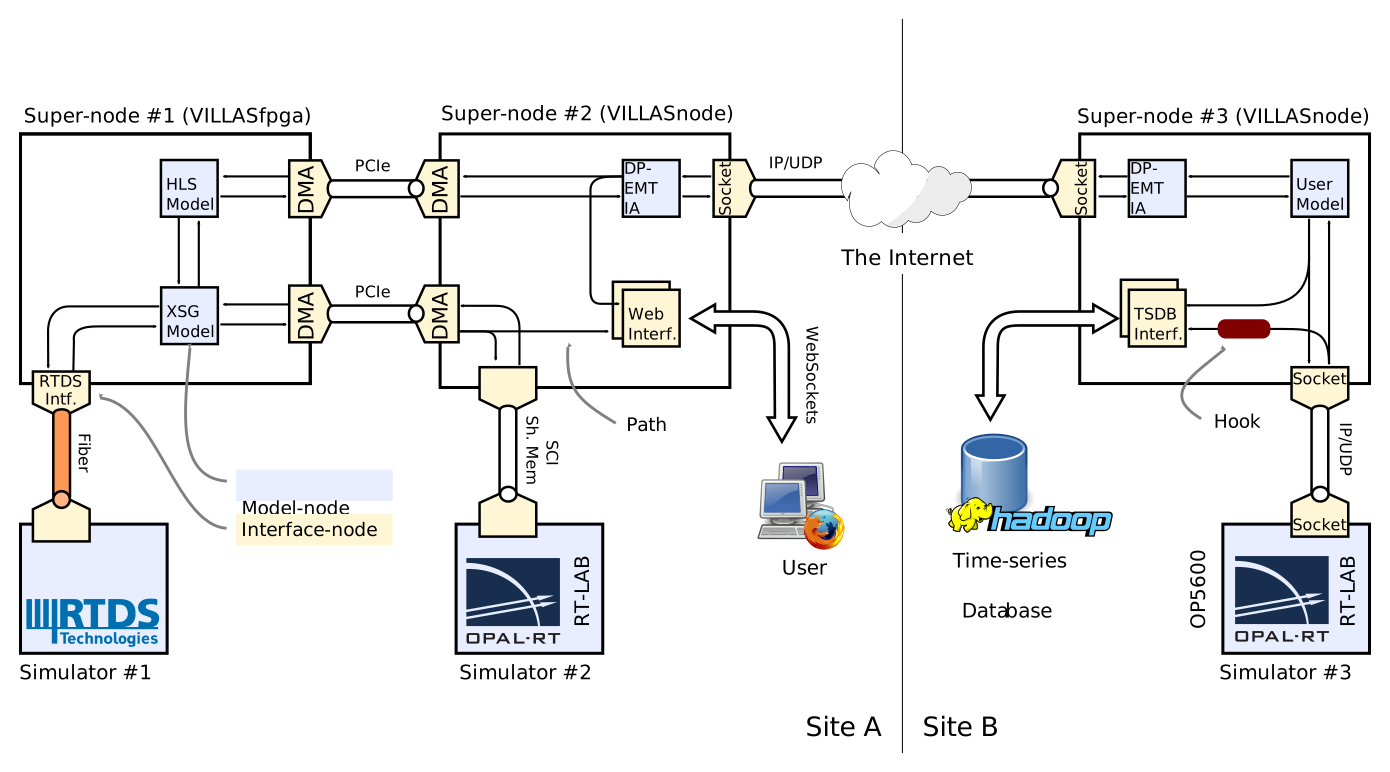
Tools
VILLASnode is a collection of command line tools which follow the Unix philosophy:
- Make each program do one thing well. To do a new job, build afresh rather than complicate old programs by adding new "features".
- Expect the output of every program to become the input to another, as yet unknown, program. Don't clutter output with extraneous information. Avoid stringently columnar or binary input formats. Don't insist on interactive input.
- Design and build software, even operating systems, to be tried early, ideally within weeks. Don't hesitate to throw away the clumsy parts and rebuild them.
- Use tools in preference to unskilled help to lighten a programming task, even if you have to detour to build the tools and expect to throw some of them out after you've finished using them.
In this guide we will show the following tools:
| Tool | Purpose |
|---|---|
villas node | The main VILLASnode daemon. |
villas signal | A signal generator for testing and training purposes. |
villas pipe | Send / receive samples to / from nodes via standard IO streams. |
villas hook | Filter or manipulate samples provided via standard IO streams. |
A complete list of available tools and commandline options can be found on the usage page.
Lab assignments
To help you get started quickly, we have prepared a series of small demos that you can try yourself. They are designed to introduce you step by step to the concepts and features of VILLASnode.
These laboratory exercises use configuration files that are included in the example configurations directory at C:\VILLASnode\etc\labs.
- Lab1: Signal generation
- Lab2: A simple configuration file
- Lab3: Sending data to node from standard input
- Lab4: Receive data from a node and show it on standard output
- Lab5: Send sine wave to simulator
- Lab6: Write received sample data to a file
- Lab7: Read samples from file and send them to node
- Lab8: Use hook function to modify/filter the data
- Lab9: Network emulation and statistics
- Lab10: The daemon
- Lab11: Multi / De-multiplexing
- Lab12: WebSockets
- Lab13: Measure Round-trip time between RTDS and VILLASnode
- Lab14: File comparison
- Lab15: Working with EtherCAT
- Lab16: Visualize simulation data with InfluxDB and Grafana
- Lab17: RTDS-RTDS Co-simulation
Video
This webinar was recorded during the preparation of the RT-SuperLab demonstration.
- Date: 8th May 2017
- Versions: VILLASnode v0.3
- Speaker: Steffen Vogel
This video presents an outdated version of VILLASnode!