Lab 18: WebRTC Peer-to-Peer communication
In this lab you will learn how to use VILLASnode's WebRTC node-type to exchange signals between two VILLASnode instances.
The major advantage of the WebRTC node-type is its plug & play nature. Unlike other node-types (e.g. Socket) almost no manual configuration is required. Imagine your real-time simulators having a video conference (e.g. Zoom / MS Teams). The only configuration required is a session ID to which you agree beforehand.
WebRTC Fundamentals
WebRTC (Web Real-Time Communication) is a technology that enables real-time communication directly between applications. It has been initially standardized for its use in voice calling, video chat, and file sharing. However, it can also be used to transport any kind of information in real-time, such as co-simulation or measurement signals, a common use case of VILLASnode.
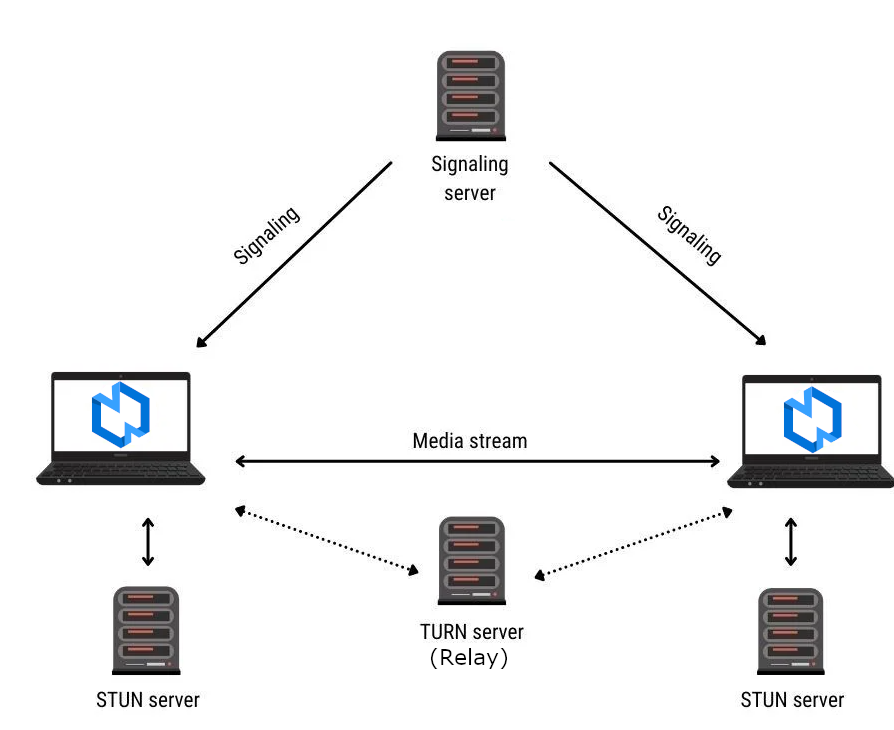
Peer-to-Peer (P2P) Architecture
WebRTC operates on a peer-to-peer basis, meaning that communication occurs directly between the devices of the users involved, without passing through a central server. This architecture reduces latency and enhances privacy by eliminating the need for intermediaries.
Signaling
Before establishing a direct connection, peers need to exchange signaling messages to negotiate the session parameters and exchange network information such as IP addresses and port numbers. Signaling can be facilitated by a signaling server or other means, but it doesn't handle the actual data transfer.
NAT Traversal
One of the challenges in peer-to-peer communication is traversing Network Address Translation (NAT) devices and firewalls, which can prevent direct connections between peers. WebRTC uses techniques like Interactive Connectivity Establishment (ICE) to discover the most efficient communication path, including relaying through TURN (Traversal Using Relays around NAT) servers if direct peer-to-peer connections are not possible.
Encryption and Security
WebRTC incorporates encryption mechanisms to ensure the confidentiality and integrity of the communication. It uses protocols like Datagram Transport Layer Security (DTLS) for key exchange and Secure Real-time Transport Protocol (SRTP) for encrypting the media streams.
Data Transport
WebRTC primarily uses the User Datagram Protocol (UDP) as its transport protocol for data transmission. UDP is preferred for real-time communication due to its low latency and reduced overhead compared to Transmission Control Protocol (TCP). However, WebRTC also supports TCP for scenarios where UDP might be blocked or unreliable, such as in restrictive network environments.
As a result, in the best case, the WebRTC node-type will have the same communication characteristics like the Socket in respect to latency and packet loss.
Requirements
To conduct this lab exercise yourself, you need:
- Some previously exchanged session ID
- Can be any string
- E.g.
my-secret-session-identifier - Hereinafter, we will use the placeholder
SESSION-IDto denote the session ID.
- Two Linux machines:
- Each with an up-to-date installation of VILLASnode
- With support for the WebRTC node-type
- Check by running:
villas-node -h
- Check by running:
- With support for the WebRTC node-type
- Each with connectivity to the Internet
- Either located in the same locale network
- Or in different networks (different sites)
- At least output TCP connections must be allowed
- Each with an up-to-date installation of VILLASnode
Overview
In this lab, we will use two VILLASnode instances (peers). Each of them is configured with same configuration file. Both peers is sending test-data generated using the the Signal generator node-type. We will be using the print hook to display the received data.

Configuration
Two configuration files are needed to have one VILLASnode instance to generate the data and the other one to loopback the data, i.e., it receives the data and sends it back directly.
Signal Generator
nodes = {
    webrtc_siggen = {
        type = "webrtc",

        format = "json"

        in = {
            signals = (
                { name = "signal", type = "float", unit = "unit" },
                { name = "signal", type = "float", unit = "unit" },
                { name = "signal", type = "float", unit = "unit" }
            )
        }

        out = {
            signals = (
                { name = "signal", type = "float", unit = "unit" },
                { name = "signal", type = "float", unit = "unit" },
                { name = "signal", type = "float", unit = "unit" }
            )
        }

        # A unique session identifier which must be shared between two nodes
        session = "villas-test"

        # Address to the websocket signaling server
        server = "https://villas.k8s.eonerc.rwth-aachen.de/ws/signaling"

        # Limit the number of times a channel will retransmit data if not successfully delivered.
        # This value may be clamped if it exceeds the maximum value supported.
        max_retransmits = 0

        # Number of seconds to wait for a WebRTC connection before proceeding the start
        # of VILLASnode. Mainly used for testing
        wait_seconds = 10 # in seconds

        # Indicates if data is allowed to be delivered out of order.
        # The default value of false, does not make guarantees that data will be delivered in order.
        ordered = false

        # Setting for Interactive Connectivity Establishment
        # If empty then configured servers in signaling server are used.
        ice = {
            # List of STUN/TURN servers
            servers = ( )
        }
    }

    siggen = {
        type = "signal"
        signal = [ "sine", "pulse", "square" ]
        values = 3          # Number of values per sample
        limit = 1           # Number of samples to generate
        rate = 1            # Rate in Hz
    }
}

paths = (
    {
        in = "siggen"
        out = "webrtc_siggen"

        hooks = ( "print" )
    },
    {
        in = "webrtc_siggen"

        hooks = ( "print" )
    }
)
Loopback
nodes = {
    webrtc_loopback = {
        type = "webrtc"

        format = "json"

        in = {
            signals = (
                { name = "signal", type = "float", unit = "unit" },
                { name = "signal", type = "float", unit = "unit" },
                { name = "signal", type = "float", unit = "unit" }
            )
        }

        out = {
            signals = (
                { name = "signal", type = "float", unit = "unit" },
                { name = "signal", type = "float", unit = "unit" },
                { name = "signal", type = "float", unit = "unit" }
            )
        }

        # A unique session identifier which must be shared between two nodes
        session = "villas-test"

        # Address to the websocket signaling server
        server = "https://villas.k8s.eonerc.rwth-aachen.de/ws/signaling"

        # Limit the number of times a channel will retransmit data if not successfully delivered.
        # This value may be clamped if it exceeds the maximum value supported.
        max_retransmits = 0

        # Number of seconds to wait for a WebRTC connection before proceeding the start
        # of VILLASnode. Mainly used for testing
        wait_seconds = 10 # in seconds

        # Indicates if data is allowed to be delivered out of order.
        # The default value of false, does not make guarantees that data will be delivered in order.
        ordered = false

        # Setting for Interactive Connectivity Establishment
        # If empty then configured servers in signaling server are used.
        ice = {
            # List of STUN/TURN servers
            servers = ( )
        }
    }
}

paths = (
    {
        in = "webrtc_loopback"
        out = "webrtc_loopback"

        hooks = ( { type = "print" })
    }
)
Steps
- Prepare the two VILLASnode instances.
- Verify that both have Internet connectivity by running:
ping rwth-aachen.de. - Create/copy the
lab18-siggen.confconfiguration file andlab18-siggen.confconfiguration file each on one machine. - Run VILLASnode on both machines:
villas node lab18-siggen.confandvillas node lab18-loopback.conf - Verify that you can see sample data being displayed on both terminals.