Lab 9: Network emulation and statistics
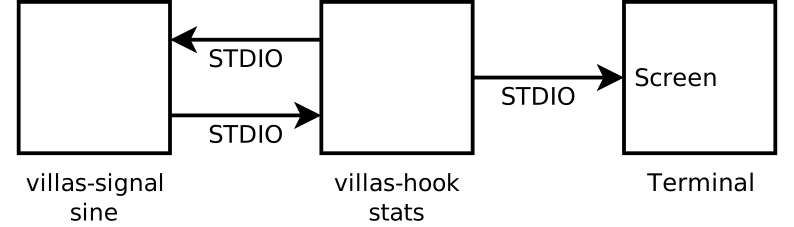
The stats hook can be used to collect statistics about the co-simulation interface like:
- One way delay (OWD)
- Packet loss
- Packet reordering
- Sending rate
villas signal -r 1000 -l 10000 sine | villas hook -o verbose=true -o warmup=3000 stats
With network emulation

node/etc/labs/lab9_netem.conf
nodes = {
    udp_node1 = {
        type = "socket"
        layer = "udp"

        in = {
            address = "*:12000"

            signals = {
                count = 8
                type = "float"
            }
        }

        out = {
            address = "127.0.0.1:12001"

            netem = {
                enabled   = true
                loss      = 0      # In %
                corrupt   = 0      # In %
                duplicate = 0      # In %
                delay     = 100000 # In uS
                jitter    = 5000   # In uS
                distribution = "normal"
            }
        }
    }
}
In the first terminal:
villas signal -r 1000 sine | villas pipe etc/lab9_netem.conf udp_node1
In a second terminal:
villas pipe etc/lab9_netem.conf udp_node1 -x > delayed_data.dat
After a few seconds, press Ctrl-C to stop the processing. Now we can analyze the delay distribution of the received data:
villas hook -o verbose=true -o warmup=1000 stats < delayed_data.dat > /dev/null
Loading...
For more details see here: Network Emulation.