Lab 8: Use hook function to modify/filter the data
VILLASnode supports hook functions to filter or manipulate samples while their are forwarded. These functions are in C-code. A plugin mechanism makes it easy for the user to new hook functions.
During this lab we will use the following hook functions:
| Name | Description |
|---|---|
average | Calculates average over some signals. |
cast | Cast signal types. |
restart | Call restart hooks for current path. |
ts | Overwrite origin timestamp of samples with receive timestamp. |
stats | Collect statistics for the current path. |
decimate | Down-sampling by integer factor. |
dp | Transform to/from dynamic phasor. |
ebm | Energy based metric. |
fix | Fix received data by adding missing fields. |
fix_ts | Update timestamps of sample if not set. |
gate | Skip samples only if an enable signal is under a specified threshold. |
jitter | Hook to calculate jitter between GTNET-SKT GPS timestamp and Villas node NTP timestamp. |
limit_rate | Limits the rate of sending signals. |
skip_first | Skip the first samples. |
stats_send | Send path statistics to another node. |
drop | Drop messages with reordered sequence numbers. |
convert | Convert message from / to floating-point / integer. |
scale | Scale signals by a factor and add offset. |
shift_seq | Shift sequence number of samples. |
map | Remap values and / or add header, timestamp values to the sample. |
print | Print the message to stdout. |
shift_ts | Shift timestamps of samples. |
A full list of supported hook functions is documented here: Hook functions
How to configure a hook function
A hook function can be used in two ways:
- With the
villas hookto process samples from standard streams. - With the
villas nodedaemon.
When used with villas hook we can pass options to the hook function as optional parameters to the invocation of villas hook:
villas hook [hook_name] [parameter1] [parameter2] ... [parameterN]
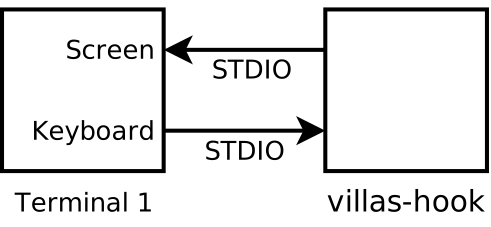
When used with villas node the hook is configured as part of a path:
nodes = {
    udp_node1 = {
        type = "socket"
        layer = "udp"

        in = {
            address = "*:12000"

            signals = (
                { name = "sig1", type = "float" },
                { name = "sig2", type = "float" },
                { name = "sig3", type = "float" },
                { name = "sig4", type = "float" }
            )
        }
        out = {
            address = "127.0.0.1:12001"
        }
    }
}

paths = (
    {
        in  = [ "udp_node1" ]
        out = [ "udp_node1" ]

        hooks = (
            {
                type = "decimate"
                priority = 1

                # Hook specific parameters follow
                # [parameter1] = [value1]
                ratio = 2
            },
            {
                type = "scale"

                signal = "sig3"
                offset = 10.0
                scale = 2.5
            }
        )
    }
)
Chaining
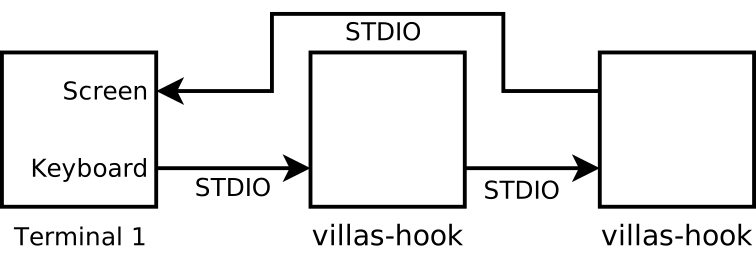
Hook functions are chainable:
villas hook fix_ts | villas hook skip_first samples=10
Examples
Skip the first 10 seconds (skip_first)
villas signal sine | villas hook skip_first -o seconds=10
Skip the first 1000 samples (skip_first)
villas signal sine | villas hook skip_first -o samples=1000
Calculate average over first five signals (average)
villas signal sine | villas hook average -o offset=0 -o signals=0,1,2,3,4
Shift the timestamps of all samples 10 seconds into the future (shift_ts)
villas signal sine | villas hook shift_ts mode=origin offset=10.0
Caste signal type (cast)
villas signal -l 10 -r 10 -F 3 -v 1 random > signals_mixed.dat
villas-hook cast -o new_name=test -o new_unit=V -o new_type=integer -o signal=1 < signals_mixed.dat
Transformation to dynamic phasor (dp)
villas signal -l 10 -r 10 -F 3 sine > dp_in.dat
villas hook dp -o inverse=true -o f0=3 -o rate=10 -o signal=0 -o harmonics=0,1,3,5,7 < dp_out.dat >dp_in2.dat
Limit the rate of sending signals (limit_rate)
villas-signal -r 1000 -l 1000 -n sine > limit_rate_in.dat
villas-hook -o rate=10 -o mode=origin limit_rate < limit_rate_in.dat > limit_rate_out.dat
Scale signals by a factor and add offset (scale)
villas signal -l 10 -r 10 -F 3 sine > scale_in.dat
villas-hook scale -o scale=100 -o offset=55 -o signal=signal0 < scale_in.dat > scale_out.dat
Every sample has three timestamps associated with it:
originreceivedsent
Use the mode parameter to select the timestamp which should be shifted.
Override the timestamp with the current time (ts, fix_ts)
echo "123.456(1) 1.2 3.4 5.6" | villas hook ts
There is another related hook function called fix_ts which will only overwrite the timestamp if the source has not provided one (timestamp must be 0.0).
echo "0.0(1) 1.2 3.4 5.6" | villas hook fix_ts
Reduce the rate by a factor (decimate)
This invocation reduces the sending rate by a factor of 10.
The resulting rate is: 1000 / 10 = 100.
villas signal -r 1000 sine | villas hook decimate -o ratio=10
This invocation reduces the sending rate by a factor of 10.
The resulting rate is: 1000 / 10 = 100.
villas signal -r 1000 sine | villas hook decimate -o ratio=10
Skip sample values based on the enable signal (gate)
This function skips values based on the enable signal which is set using one of the following modes. above below rising_edge falling_edge
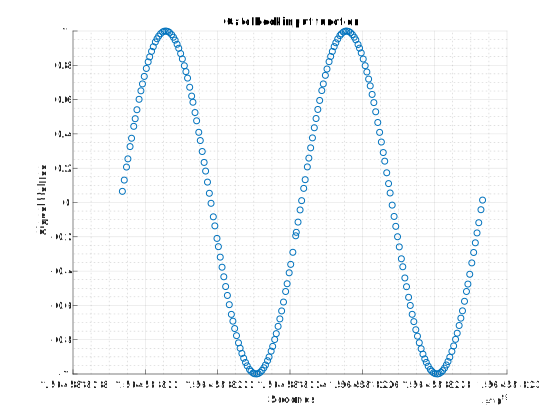
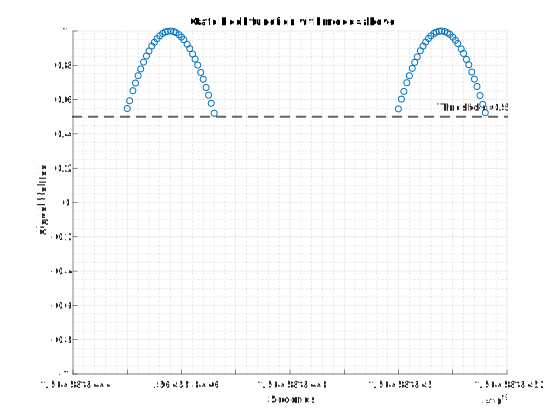
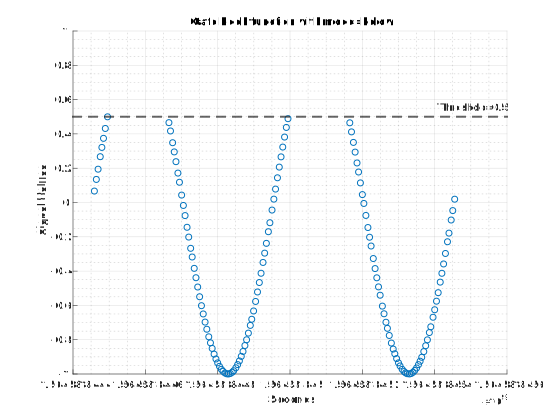
The 'above' mode allows only the signal values which are greater than the threshold. By default the threshold is set to 0. Similarly the 'below' mode allows only the signal values which are lesser than the threshold. This can be visualized in the waveforms below:
villas signal -l 200 -r 200 -F 2 sine > gate_in.dat
villas hook gate -o signal=0 -o mode=above -o threshold=0.5 < gate_in.dat > gate_out_above.dat
villas hook gate -o signal=0 -o mode=below -o threshold=0.5 < gate_in.dat > gate_out_below.dat
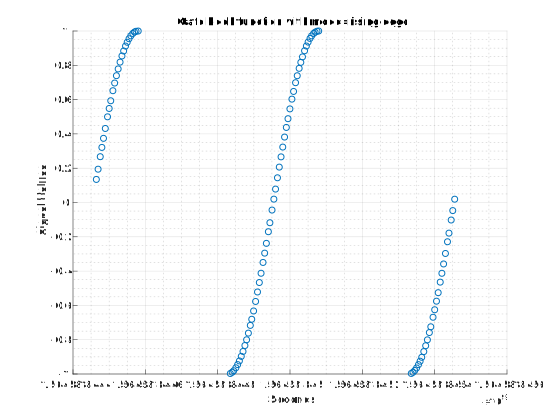
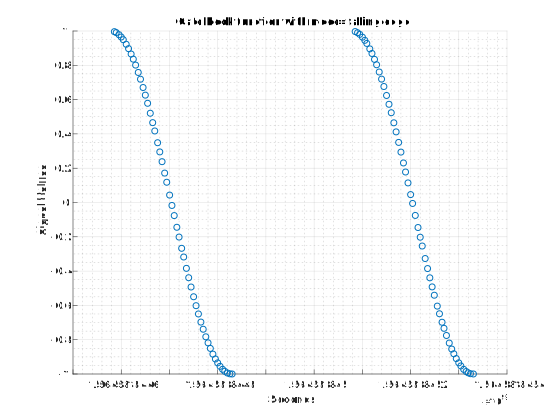
The modes rising edge and falling edge allow signal values to pass on rising edge and falling edge respectively. It is demonstrated by the examples and waveforms below:
villas signal -l 200 -r 200 -F 2 sine > gate_in.dat
villas hook gate -o signal=0 -o mode=rising_edge < gate_in.dat > gate_out_re.dat
villas hook gate -o signal=0 -o mode=falling_edge < gate_in.dat > gate_out_re.dat
Convert values between floating point / integer representation (convert)
This invocation converts values 5-8 to a integer number with a gain factor of 1000:
villas signal sine | villas hook convert 'mode="fixed" mask=0xf0 scale=1000.0'
Print samples to the screen (print)
villas signal sine | villas hook print > /dev/null
Note: villas hook by default prints the processed stream of samples already to the screen. Therefore, every sample appears now twice on the screen. This hook only makes sense when used together with villas none.
Remap values and add special header fields as data (map)
villas signal -v 4 sine | villas hook map 'mapping=[ "data[3]", "data[2]", "data[1]", "data[0]", "hdr.sequence", "ts.origin" ]'
Implement your own hook function
Have a look at the following skeleton code: https://github.com/VILLASframework/node/blob/master/plugins/example_hook.cpp.