Lab 11: Multi / De-multiplexing
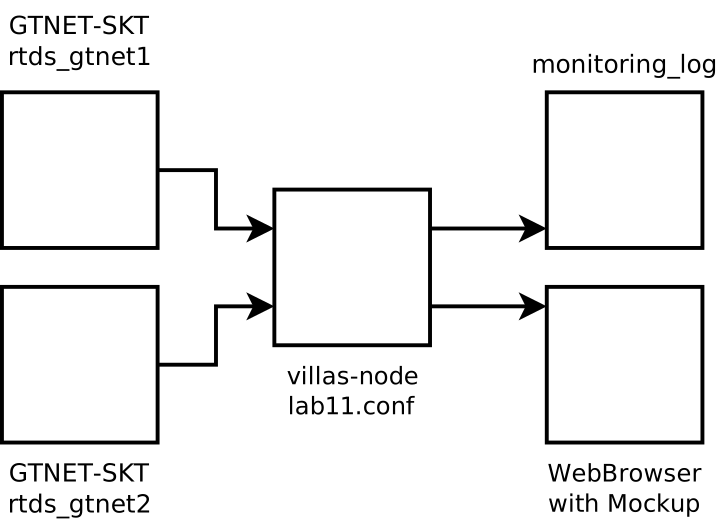
In scenarios with more than two simulators which are connected in a star topology, merging / splitting of values originating / targeting from different simulators becomes necessary. This is implemented in VILLASnode in the concept of (de-)multiplexing.
The following configuration settings in a path definition are relevant and described in this lab session.
Multiplexing
Multiplexing describes the process of merging signals from multiple input nodes into a single sample which then is processed further in its entirety.
In this lab session, we multiplex signals originating from nodes rtds_gtnet_1 and rtds_gtnet_2 into a single path.
VILLASnode supports multiplexing by using mapping expressions in the paths[].in setting of a path.
We can construct samples by joining joining multiple mapping expressions as seen in the configuration file below.
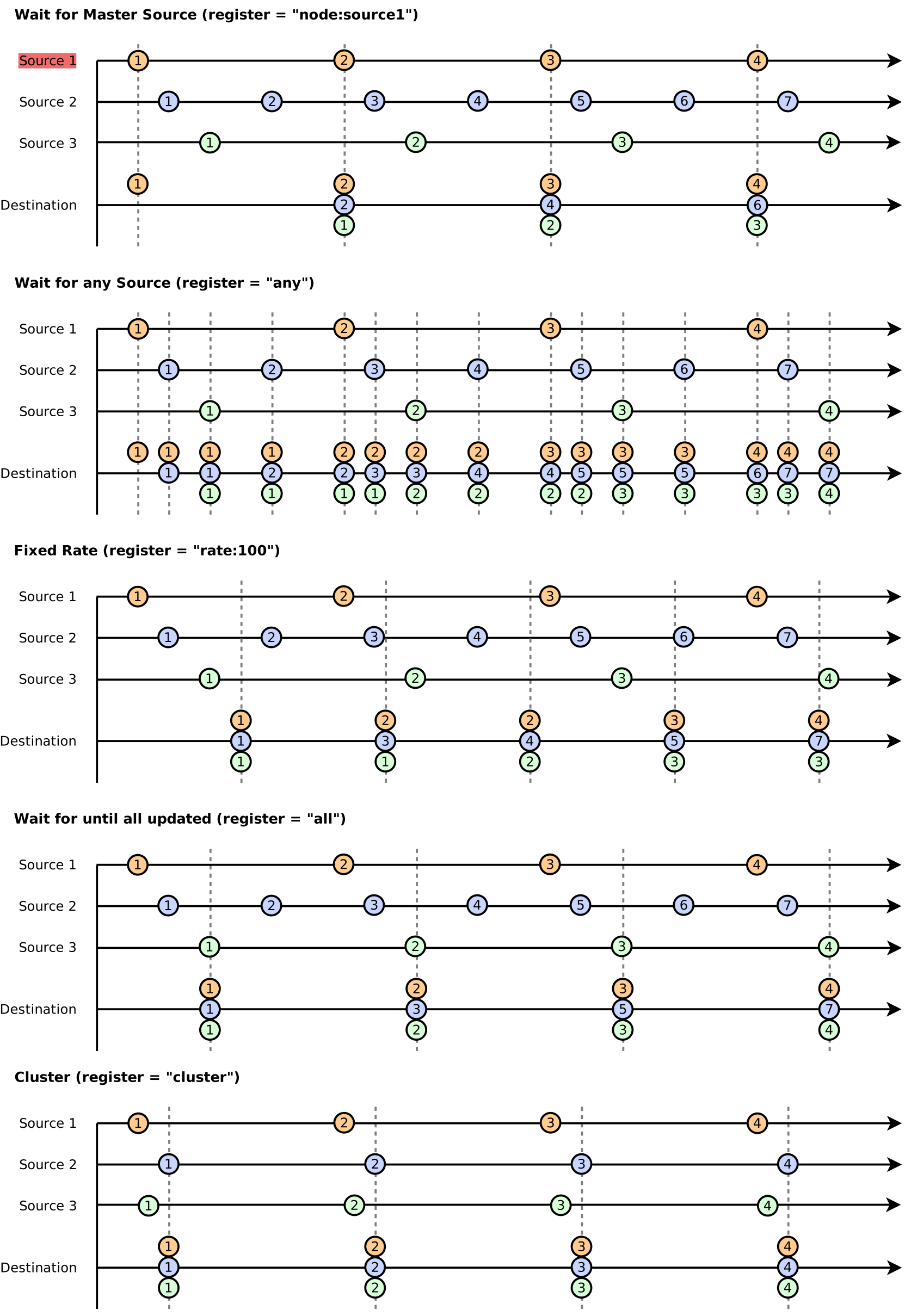
VILLASnode paths support two major operating mode which can be selected using the paths[].mode setting.
mode = "all"causes the path to be triggered, and subsequantially emitting samples to its outputs, once all of the masked input nodes receive new data. This mode behaves like a barrier which is opened once we received an update from all masked inputs. This mode effectively reduces the number of samples which we sent to the destination nodes/mode = "any"causes the path to be triggered anytime one of the masked inputs receive new data. In this mode each sample received from any of the inputs triggers new samples to be sent to all destinations.
The paths[].mask setting allows the user to limit the effect of the paths[].mode setting to certain input nodes. By default the path mask includes all input nodes of a path.
De-multiplexing
De-multiplexing describes the process of selecting a set of signals from a sample to create a new sample.
VILLASnode supports de-multiplexing by using mapping expressions in the paths[].in setting of a path.
Configuration file
nodes = {
    rtds_gtnet1 = {
        type = "socket"
        layer = "udp"
        format = "gtnet"

        in = {
            address = "*:12000"

            signals = {
                count = 8
                type = "float"
            }
        }
        out = {
            address = "134.130.169.89:12000"
        }
    }

    rtds_gtnet2 = {
        type = "socket"
        layer = "udp"
        format = "gtnet"

        in = {
            address = "*:12001"

            signals = {
                count = 8
                type = "float"
            }
        }
        out = {
            address = "134.130.169.90:12001"
        }
    }
    monitoring = {
        type = "websocket"
    }
    monitoring_log = {
        type = "file"

        uri = "ftp://acs:fake@134.130.169.32/var/villas/log/monitoring_%Y-%m-%d_%H_%M_%S.dat"

        out = {

        }
    }
}

paths = (
    {
        # Combine data from rtds_gtnet1 and rtds_gtnet2
        in = [
            "rtds_gtnet1.ts.origin",
            "rtds_gtnet1.hdr.sequence",
            "rtds_gtnet1.data[0-6]",

            "rtds_gtnet2.ts.origin",
            "rtds_gtnet2.hdr.sequence",
            "rtds_gtnet2.data[0-6]"
        ]

        out = [
            "monitoring",
            "monitoring_log"
        ]

        reverse = false

        # The mode of a path determines when the path is triggered
        # and forwarding samples to its destination nodes
        mode = "any"

        # List of nodes which trigger the path
        mask = [
            "rtds_gtnet1",
            "rtds_gtnet2"
        ]

        hooks = (
            # We do not want to overload the WebBrowsers
            {
                type = "decimate"
                ratio = 10
            }
        )
    }
)
The register modes