Lab 5: Send sine wave to simulator

We can combine the villas signal and villas pipe tools to send a sine wave to a node.
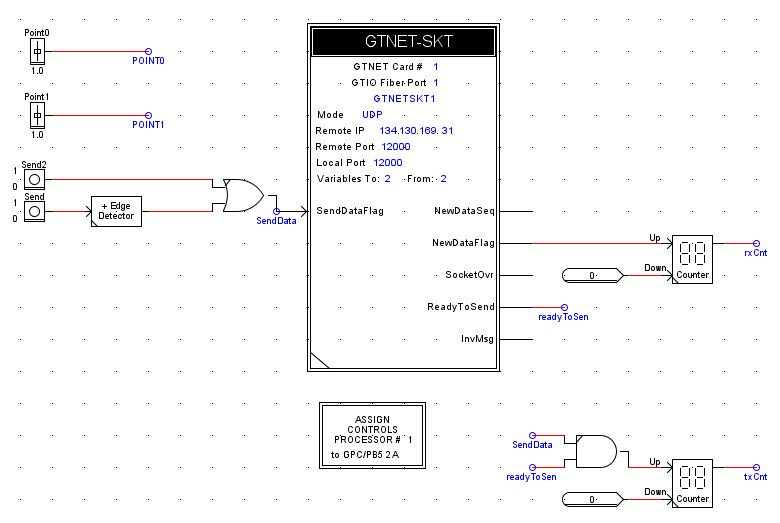
In this lab, the node is a RTDS GTNETv2 card running the SKT firmware.
We use a slightly modified configuration file in order to change the UDP packet format:
node/etc/labs/lab5.conf
nodes = {
    rtds_gtnet1 = {
        type = "socket"
        layer = "udp"
        format = "gtnet"

        in = {
            address = "*:12000"

            signals = {
                count = 8
                type = "float"
            }
        }

        out = {
            address = "134.130.169.89:12000"
        }
    }
}
villas signal -v 4 -r 1000 mixed | villas pipe lab5.conf rtds_gtnet1
villas signal -f 50 -r 10000 sine | villas pipe lab5.conf rtds_gtnet1
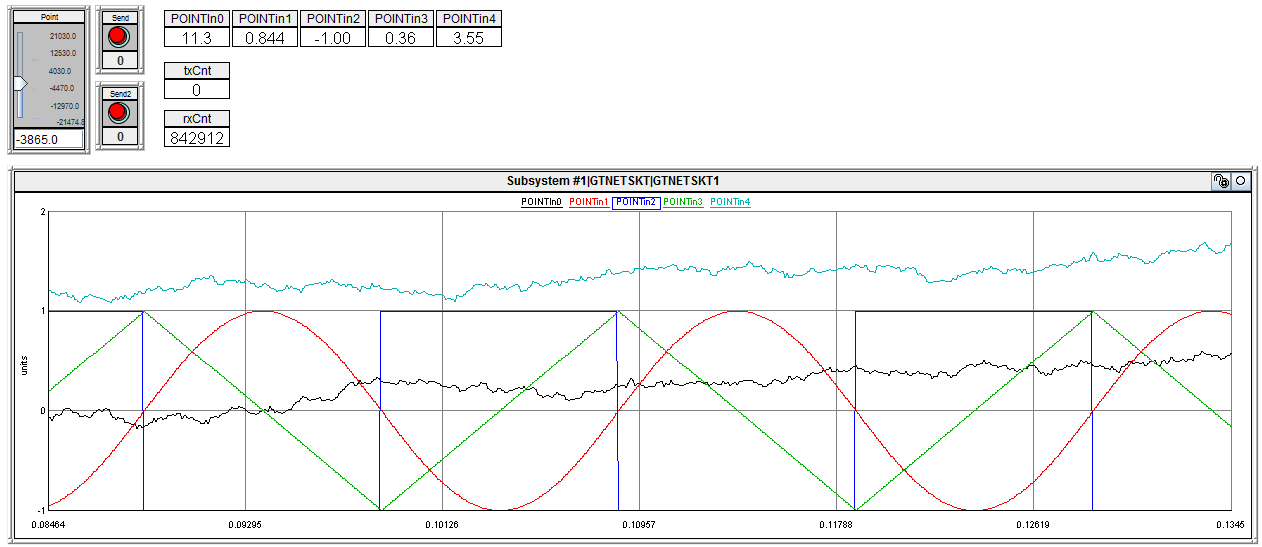
As we can see in the diagram, the villas pipe tool also receives data which is sent by the simulator and prints it to the screen.
RSCAD
Source: https://github.com/VILLASframework/node/tree/master/clients/rtds/gtnet_skt/gtnet_skt_udp_2point